
 By Clay Leger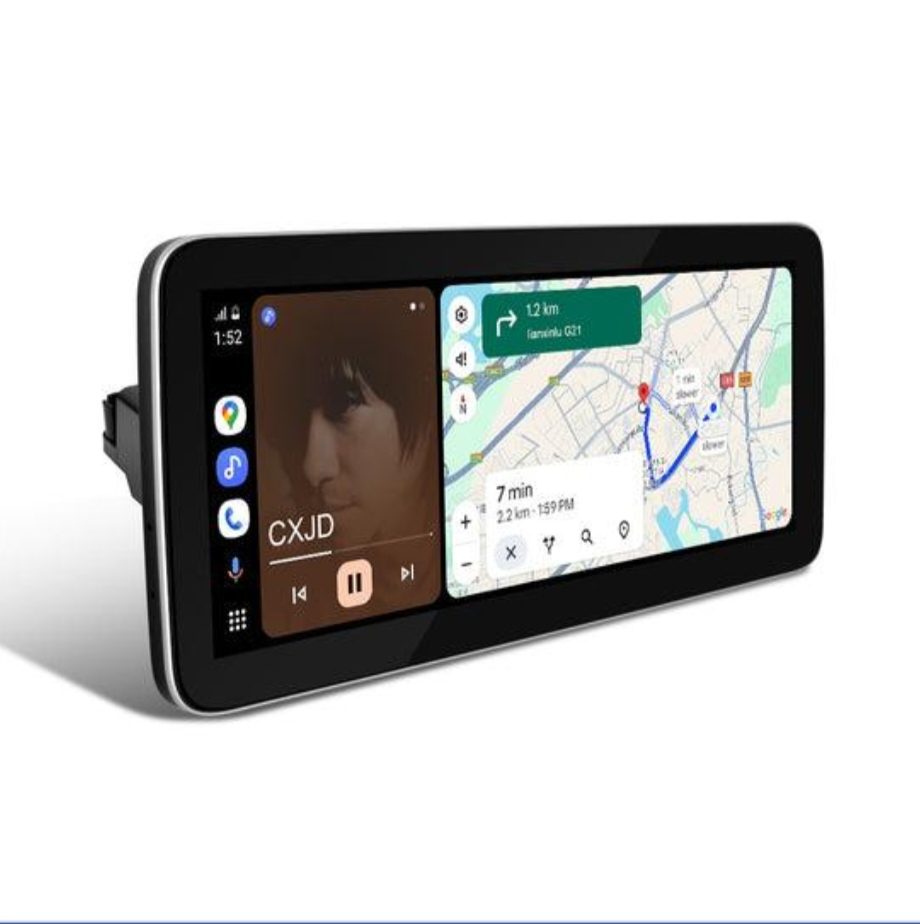
Modern BMW owners are no longer satisfied with factory-installed infotainment systems that age quickly in a world where technology evolves at breakneck speed. Whether you drive a classic E-series or a mid-generation F-series, the desire to bring cutting-edge connectivity and multimedia functionality into your cabin has never been stronger. This growing demand has sparked a thriving market for aftermarket upgrades, and at the center of it all is one critical decision: should you retrofit your BMW with an Android-based screen or a Linux-based screen?
Both options promise to transform your driving experience, but they differ significantly in how they deliver on that promise. Understanding the distinction between these two platforms is essential before investing in any upgrade. This article breaks down the features, benefits, and practical considerations of each option, giving tech-savvy drivers the clarity they need to choose the retrofit screen that best matches their lifestyle, preferences, and long-term goals.
Understanding BMW Retrofit Solutions: An Overview
BMW retrofit solutions refer to aftermarket upgrades that replace or enhance factory-installed infotainment systems, bringing modern functionality to older E-series and F-series models that were never equipped with today’s connectivity standards. Rather than trading in a well-loved vehicle, drivers can invest in purpose-built hardware that slots directly into existing dashboard architecture without compromising the car’s original character. Brands like PEMP Car Audio have carved out a strong reputation in this space by engineering products specifically calibrated for BMW’s unique electrical systems and CAN-bus communication protocols, ensuring that upgrades feel native rather than bolted on.
The appeal among tech-savvy drivers is straightforward: why accept a decade-old interface when a single retrofit can deliver smartphone mirroring, high-resolution displays, and real-time navigation? Compatibility and build quality are the two pillars that separate a worthwhile investment from a frustrating experiment. The two dominant platform choices available today are Android-based screens, which prioritize app flexibility and a familiar mobile-like experience, and Linux-based screens, which emphasize system stability and lean resource usage. Knowing the strengths of each platform is the first step toward a retrofit that genuinely improves daily driving.
Deep Dive: BMW Android Screen Features and Benefits
The BMW Android screen runs on a customized version of the Android operating system, bringing the same intuitive environment that billions of smartphone users already know. This familiarity is one of its strongest selling points. From the moment you power it on, the interface feels approachable, with a touchscreen layout that mirrors modern mobile devices while remaining practical for in-car use. High-resolution displays — typically ranging from 8 to 12 inches depending on the model — deliver crisp visuals for maps, media, and menus alike.
Connectivity is where Android screens genuinely shine. Built-in Wi-Fi and Bluetooth allow seamless pairing with smartphones, enabling wireless Android Auto and Apple CarPlay alongside native app support. Drivers can install navigation apps like Google Maps or Waze, stream music through Spotify, or even use voice assistants without ever touching a separate device. This level of integration makes the Android screen particularly attractive to drivers who rely heavily on their phones throughout the day.
Customization options are extensive. Users can adjust home screen layouts, install third-party applications from the Google Play Store, and tailor the interface to personal preferences — something factory BMW systems rarely allow. Regular over-the-air software updates also mean the platform stays current without requiring hardware replacement.
Compatibility spans a wide range of BMW E-series and F-series models, with Android screens engineered to include BMW-specific CAN-bus integration, preserving steering wheel controls, parking sensors, and climate display functions.
Solution Steps for Android Screen Installation
Start by confirming your BMW’s model year and existing head unit type to verify hardware compatibility. Purchase from a reputable supplier to ensure you receive a unit pre-configured for BMW’s electrical architecture. Follow the manufacturer’s wiring diagram carefully, connecting the CAN-bus adapter before mounting the unit. Once installed, power on the system and run a full functionality test — checking steering wheel controls, reverse camera feed, and Bluetooth pairing — before finalizing the dashboard reassembly.
Exploring Linux Screen for BMW: What You Need to Know
The Linux screen for BMW takes a fundamentally different approach to in-car computing. Rather than borrowing from the smartphone ecosystem, it runs on a purpose-built Linux-based operating system engineered specifically for automotive environments. This means the software is lean, tightly controlled, and optimized for one job: delivering reliable in-car functionality without the overhead that comes with a general-purpose mobile OS. The result is a system that boots faster, consumes fewer resources, and maintains consistent performance across years of daily use.
Where Android screens compete on breadth, Linux screens compete on depth. Core functions — audio playback, navigation, vehicle data display, and climate controls — are handled with exceptional stability. Because the operating system isn’t managing background app processes or pushing notifications, the interface remains responsive even in demanding conditions like extreme temperatures or long continuous operation. For drivers who primarily want a clean, distraction-free environment rather than a second smartphone mounted on the dash, this focused experience is genuinely appealing.
Security is another practical advantage. Linux-based systems have a significantly smaller attack surface than Android, meaning fewer vulnerabilities and no exposure to malicious third-party applications. Maintenance demands are also minimal — there are no app stores to manage, no permission prompts, and no fragmentation issues as software matures. This translates to lower long-term ownership costs and fewer headaches over time.
The trade-off is clear: Linux screens offer limited third-party app support and a less visually dynamic interface compared to Android. Drivers who want Spotify, Waze, or voice assistants natively will find the Linux platform restrictive. However, for BMW owners who value hardware longevity and system integrity above all else, it remains a compelling choice.
Solution Steps for Linux Screen Setup
Begin by verifying that your BMW model’s wiring harness and CAN-bus configuration are compatible with the specific Linux unit you’ve selected — supplier documentation will list supported chassis codes explicitly. Source your hardware from an established retailer to guarantee firmware authenticity and after-sale support. During installation, mount the unit according to the provided bracket specifications and connect all auxiliary inputs — reverse camera, microphone, and steering wheel controls — before powering the system. After initial boot, navigate to the system settings to configure regional language, display brightness, and audio output levels. Run a complete diagnostic check by cycling through each function: test navigation responsiveness, confirm CAN-bus data is reading correctly, and verify that factory features like parking sensors remain fully operational. Linux screens rarely require post-installation updates, but check the manufacturer’s support page periodically for any firmware patches that address long-term durability.
Head-to-Head Comparison: Android vs. Linux for Your BMW
Choosing between a BMW Android screen and a Linux screen ultimately comes down to understanding where each platform excels and where it falls short. Performance is the first battleground. Android screens handle multitasking well, but that capability comes with a cost — background processes consume memory and processing power, occasionally causing lag during heavy use. Linux screens, by contrast, dedicate every available resource to core functions, delivering snappier response times and near-instant boot speeds that remain consistent year after year.
App availability is perhaps the sharpest dividing line between the two platforms. Android gives drivers access to the Google Play Store, meaning navigation, music streaming, and productivity tools are all within reach. Linux screens offer no comparable ecosystem — the software you get at purchase is essentially what you keep. For drivers who rely on real-time traffic apps or podcast platforms during their commute, this distinction alone may settle the debate.
The user interface tells a similar story. Android’s touch-based layout feels immediately familiar to smartphone users, with visual customization options that let drivers personalize their experience. Linux interfaces are functional and clean but intentionally minimal, prioritizing clarity over personality. Neither approach is wrong — they simply serve different preferences.
From a cost and compatibility perspective, both platforms are available across a broad range of BMW E-series and F-series models. Android units tend to carry a slightly higher price point due to licensing and hardware demands, while Linux screens offer a cost-efficient entry point for drivers who don’t need extensive app support. Long-term, Linux screens require less maintenance and carry lower update-related risks, whereas Android screens benefit from ongoing software improvements that extend functional relevance over time. Tech-savvy drivers who want innovation should lean Android; those who prioritize rock-solid reliability will find Linux the more rewarding investment.
How to Choose: Practical Guide for Tech-Savvy Drivers
The right retrofit screen isn’t the one with the longest feature list — it’s the one that aligns with how you actually use your car. Start by honestly assessing your daily driving habits. If your commute depends on live traffic rerouting, music streaming, or hands-free calls through a familiar smartphone interface, an Android screen is the practical choice. If you prioritize a system that simply works without ongoing management, a Linux screen deserves serious consideration.
Budget matters, but think beyond the purchase price. Android units typically cost more upfront and may require periodic software attention, while Linux screens offer lower entry costs and minimal long-term maintenance. Factor in your BMW’s model year and existing wiring configuration — not every unit supports every chassis, so cross-referencing compatibility documentation from suppliers like PEMP Car Audio before purchasing prevents costly mismatches. Reading verified owner reviews and consulting installation communities specific to your BMW series will surface real-world performance insights that spec sheets often miss. When in doubt, prioritize suppliers with documented after-sale support, because even the best hardware occasionally needs troubleshooting assistance after installation.
Making the Right Retrofit Choice for Your BMW
Both the BMW Android screen and the Linux screen represent genuine improvements over aging factory infotainment systems, but they serve distinctly different drivers. Android screens deliver a rich, app-driven experience with smartphone-level connectivity, continuous software updates, and deep customization — ideal for drivers who want their car to feel as dynamic as the rest of their digital life. Linux screens counter with unmatched stability, lean resource usage, and minimal maintenance demands, making them the right fit for owners who want dependable core functionality without the complexity of a mobile ecosystem.
Neither platform is universally superior. The best retrofit is the one that matches your actual priorities — whether that means real-time navigation and music streaming or a rock-solid system that simply performs the same way on day one thousand as it did on day one. Take the time to assess your habits, consult compatibility documentation, and invest in quality. The right screen upgrade won’t just modernize your dashboard — it will genuinely transform how you experience every drive.